 Snagline
Property inspection apps: what a good one should do
A property inspection app replaces the clipboard, camera and later write-up with one phone. A good one lets you take photos and mark them up, organise findings room by room, work without signal, and produce a branded PDF report you can send before you leave. Choose by the report you need to hand over, not by the length of the feature list.
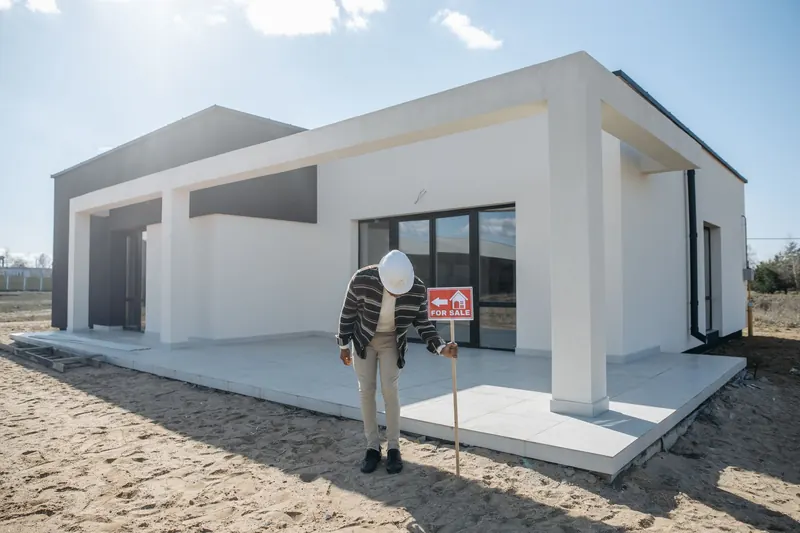
What a property or building inspection app should do
Whatever the kind of inspection, the job is the same: walk round, record what you find with evidence, and hand over a report someone else can act on. These are the features that make the difference on the day.
Photos with markup
The photo is the evidence. You need to take several per item (a close-up and a wider shot showing where it is), then draw an arrow, circle or box on it and add a short label. A timestamp on the photo helps if the report is ever disputed.
A room-by-room or area-by-area structure
Inspections follow a route: hallway, kitchen, bedroom 1, and so on, or block, floor, unit on a larger building. The app should let you tag each item with its location and sort or filter by it, so the report reads in the same order as the building.
Offline working
Basements, new builds with no broadband, rural properties and plant rooms often have no signal. An inspection app should save everything on the phone as you go and sync later, rather than failing to load mid-inspection.
Priorities, status and follow-up
Each item needs a priority and a status, and ideally an owner and a due date, so you can come back, re-inspect and close items that are actually fixed.
Report output
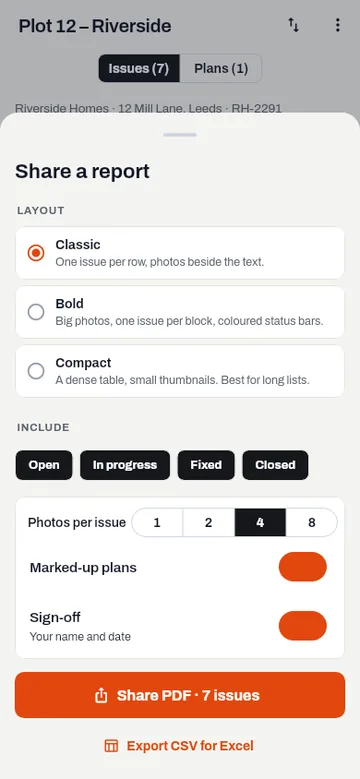
The report is what the client pays for. Look for a PDF with a cover page, your company details, counts of items, photos next to each item, and a signature. A spreadsheet export (CSV) is useful when the client tracks actions in Excel.
Your branding
If the report goes to clients, your logo and company details on the cover matter. Check whether branding is included or needs a paid plan.
Floor plans
On larger buildings, pins on a drawing show exactly where each item is faster than any description.

Who uses property and building inspection apps
| User | Typical inspection | What matters most |
|---|---|---|
| Surveyors | Condition surveys, dilapidations, pre-purchase surveys | Element-by-element structure, many photos, a professional report |
| Landlords and letting agents | Check-in and check-out, mid-tenancy inspections | Room-by-room order, dated photos, a report the tenant can sign |
| Snagging inspectors and new-home buyers | New-build snagging before or after completion | Fast capture, trade categories, a list the developer can work through |
| Building contractors and site managers | Quality checks, pre-handover inspections, punch lists | Owners and due dates, status tracking, re-inspection |
| Facilities and maintenance teams | Planned inspections of buildings they look after | Repeat inspections of the same property, history of items |
The groups overlap, and so do the apps. Some are built around templates and scored checklists, some around room-by-room inventories, and some around lists of defects or issues. Decide which shape your work has before you compare.
Checklist-based, inventory-based or issue-based?
- Checklist-based apps walk you through a fixed list of questions (pass, fail, not applicable). Good for compliance and safety audits where every site gets the same questions.
- Inventory-based apps record the condition of every item in every room. Good for lettings check-in and check-out, where you need a full record of condition, not only problems.
- Issue-based apps record only what is wrong, as a numbered list of defects with photos, priority, owner and status. Good for snagging, punch lists, quality inspections and any inspection where the point is to get things fixed.
If you mostly write lists of things to fix, an issue-based app will be quicker. If you need to prove the condition of everything, look for an inventory-based one.
Questions to ask before you choose
- Does it work fully offline, including photos?
- How many photos can I add to one item, and can I mark them up?
- Can I record a location for each item and sort the report by it?
- What does the PDF report look like? Ask for a sample.
- Can I add my logo and a signature, and on which plan?
- Does it run on the phones my team uses (iPhone, Android or both)?
- Is pricing per user, per project or flat?
- Where is the data stored, and can I export it if I leave?
Snagline: an issue-based option
Snagline is a phone app for snag lists, site audits and punch lists, for iPhone and Android. It is not released yet; you can join the waitlist below. It is issue-based: it records what needs fixing rather than a full inventory of every room.
- Projects for each property or job, with client, site address, reference, notes and a cover photo.
- Numbered issues with title, description, several photos, status (Open, In progress, Fixed, Closed), priority (Low to Critical), location, trade, assignee and due date. Drag to reorder and the numbers follow.
- Snap issue: camera first, then describe it. Mark up photos with pen, arrows, boxes, circles and text labels. Optional timestamps and GPS location under photos.
- Floor plans: add an image of a drawing and drop numbered pins coloured by status.
- Reports: PDF in three layouts with a cover, company details, logo and issue counts; filter by status, choose photos per issue, add a signature; CSV export for Excel.
- Offline: everything is saved on the phone as you go. Sign in with an emailed code to sync between devices.
The free plan covers up to 3 projects and 3 photos per issue with Classic PDF reports. Snagline Pro (with a 7-day free trial) adds sync, unlimited projects and photos, floor plans, logo and signature, all report layouts and CSV, with no per-seat pricing. See pricing.
Tips for inspecting with a phone
- Charge up and carry a power bank. Photos and the screen on full brightness drain a battery quickly.
- Follow the same route every time, front door to back, top floor to bottom, so reports from different visits line up.
- Two photos per item: a marked-up close-up and a wider shot that shows where it is.
- Describe, measure, then move on. Location first, what you see, and a measurement where you can: Bedroom 2: socket cover missing behind door, Electrical, High.
- Send the report before you leave, or the same day, while details are fresh.
For the sections a finished report should have, see the inspection report template; for new homes, the new build snagging checklist.
Common mistakes when choosing an inspection app
- Choosing on features you will never use. Start from the report you hand over and work backwards.
- Not testing offline. Put the phone in flight mode and do a mock inspection before you commit.
- Ignoring the export. Make sure you can get your data and photos out.
- Forgetting the second visit. The app should make re-inspection and closing items easy, not only the first walk round.
Questions
What is the best app for property inspections?
It depends on the report you produce. Checklist apps suit compliance audits, inventory apps suit lettings check-in and check-out, and issue-based apps suit snagging and defect inspections. Test the offline mode and ask for a sample report.
Can I do a building inspection on my phone?
Yes. A phone can take and mark up the photos, record each item with its location and priority, and produce a PDF report on site. Check the app works offline if the building has poor signal.
Do property inspection apps work offline?
Many do, but not all. Look for one that saves everything, including photos, on the phone as you go and syncs when you are back online.
What should a property inspection report include?
The property address, inspector, date, scope, a list of findings with location, description, priority and photos, recommendations and a signature. See the inspection report template for a full layout.
Is Snagline available now?
Not yet. Snagline is in development for iPhone and Android; you can join the waitlist to hear when it launches.