 Snagline
Construction punch list apps: what to look for, and how a punch walk works on a phone
A punch list app replaces the clipboard, the camera roll and the spreadsheet on a construction punch list. You walk the job with your phone, photograph each item, mark it up, pin it on the floor plan and assign it to a sub with a due date. At the end you send a PDF report to the owner or architect without typing anything up.

Why move the construction punch list to a phone
A paper or spreadsheet punch list breaks down in the same places on every job. Photos live on someone's phone with no link to the item. Descriptions written on a clipboard get retyped at night, and details get lost. Several versions of the list circulate, and nobody is sure which one the architect has.
An app fixes this by capturing everything at the moment you find it: the photo, the location, the trade and the status sit on one record. The list you walk with is the list you send.
What to look for in a punch list app
Use this as a checklist when you try apps. A good one handles the first eight well; the rest depend on your team.
- Fast capture. Camera first, then a few words. If adding an item takes longer than writing it on paper, people stop using it on the walk.
- Several photos per item, with markup: arrows, circles and text so the sub sees exactly which outlet or which corner.
- Plan pins. Drop numbered pins on the floor plan so anyone can find item 37 without asking.
- Numbered items that stay stable, so "item 37" means the same thing in the field and in the report.
- Status that separates "fixed" from "closed", so a sub saying done is not the same as the GC checking it.
- Trade, assignee, priority and due date on every item, with overdue items flagged.
- Works offline. Basements, stairwells and new concrete buildings often have no signal. The app should save everything on the phone and sync later.
- Clean reports. A PDF with photos, plan markups and a cover page you'd be happy to send the owner, plus a CSV or Excel export for your own tracking.
- Sign-off. A signature on the report helps at the final walkthrough.
- Sharing with subs and the architect, if they need to update items themselves rather than receive a report.
- A pricing model that fits your team (see below).
Per-seat or flat pricing?
Punch list apps are usually priced in one of two ways, and the difference matters more than the headline number.
| Model | How it works | Suits |
|---|---|---|
| Per seat (per user) | You pay for each person with an account, often monthly | Teams where many people log in and update items, such as GCs who give subs accounts |
| Flat or per device | One subscription regardless of how many people receive reports | A super, inspector or small contractor who walks the job and sends reports out |
| Free tier | Limited projects or features at no cost | Trying the workflow on a real job before paying |
Before you commit, count who actually needs to edit items and who only needs to read a PDF. If most people only read, paying per seat for them is wasted money. Also check what a free tier leaves out (photo limits, report branding, exports), whether you can pay monthly, and whether you keep your reports if you cancel.
How a punch walk works on a phone
- Set up the project before you go. Add the job name, site address, client and reference, and import the floor plans as images.
- Walk in a fixed route. Top floor down or room by room, the same as with paper.
- Snap, then describe. Take the photo, draw an arrow or circle on the defect, and type a short title: "Outlet cover missing, east wall."
- Tag it. Location, trade, priority. Assign it to the sub and set a due date if you know it.
- Pin it on the plan. One tap on the drawing puts a numbered pin where the item is.
- Review before you leave. Scroll the list, merge duplicates, reorder items into walking order.
- Send the report. Share a PDF with the architect and owner, and filtered lists (or the CSV) with each sub.
- Re-walk to close. On the back-check, filter for items marked fixed, look at each one and close it or reopen it with a note.
If you'd rather start on paper, our punch list template uses the same fields, so moving to an app later is easy.
Mistakes teams make when switching to a punch list app
- Setting it up on the day of the walk. Create the project, add the plans and agree the trade names the day before. Fiddling with settings in front of the architect wastes everyone's time.
- Only one person knows the app. If the super is out sick, someone else should be able to pick up the list and send a report.
- Skipping the markup. A photo of a whole wall with no arrow is barely better than no photo. Circle the defect every time.
- Too many photos, too little text. The title should still make sense on a printed list with the photos cut out.
- Not testing offline. Put the phone in airplane mode and add an item before you rely on it in a basement.
- Running the app and the spreadsheet side by side. Two lists drift apart within a week. Pick one as the master and export from it.
How Snagline handles punch lists
Snagline is our phone app for punch lists, snag lists and site audits, built for trades, contractors, superintendents and inspectors on iPhone and Android. It is not released yet; you can join the waitlist at the bottom of this page. Here is how it maps to the punch walk:
- Projects for each job, with client, site address, reference, notes and a cover photo.
- Numbered items. Drag to reorder and the numbers follow. Each item has a title, description, several photos, location, trade, assignee and due date, with overdue items flagged.
- Status and priority: Open, In progress, Fixed, Closed; Low, Medium, High, Critical. Fixed vs Closed gives you the sub-says-done vs GC-checked split.
- Snap issue: camera first, then describe. Mark up photos with pen, arrows, boxes, circles and text labels. Optional timestamp and GPS under each photo.
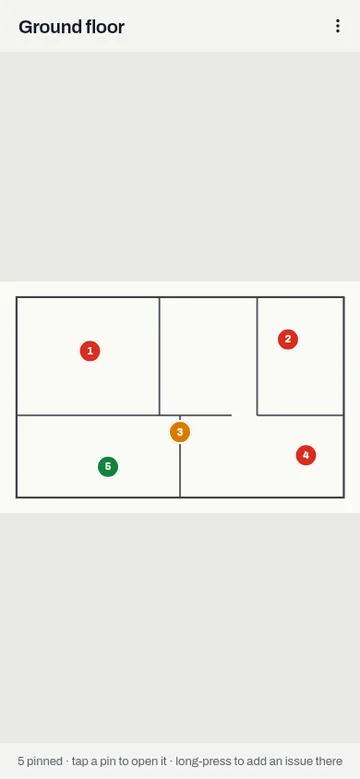
- Floor plans: add an image of a drawing and drop numbered pins colored by status; tap a pin to open its item.
- Reports: PDF in three layouts with your company details, logo and item counts on the cover, status filters, chosen photos per item, marked-up plans and a signature for sign-off. CSV export for Excel.
- Offline: everything saves on the phone as you go. Sign in with an emailed code to sync projects and photos between devices.
Pricing is simple: a free plan for up to 3 projects with 3 photos per item and Classic PDF reports, and Snagline Pro (a subscription with a 7-day free trial) for sync, unlimited projects and photos, floor plans, logo and signature, all report layouts and CSV. There is no per-seat pricing. See pricing for current prices.
When a full project management platform fits better
Snagline is built for the person walking the job and sending the report. Larger GCs often want the punch list inside a full construction management platform, where it connects to RFIs, submittals, drawings with version control, daily logs and subcontractor accounts. Platforms such as Procore and Fieldwire are built for that, and if your company already runs one, its punch list tools keep everything in one system.
A simple way to decide: if many people across several companies need to log in and update the same items, look at a project management platform. If one or a few people walk, record and send, a focused punch list app is usually quicker to learn and cheaper to run.
Questions
What is the best app for a construction punch list?
It depends on your team. Large GCs that manage RFIs, submittals and many subs often use a platform such as Procore or Fieldwire; a superintendent, inspector or small contractor who walks and sends reports may prefer a focused phone app with photos, plan pins and PDF reports.
Can I make a punch list on my phone?
Yes. A punch list app lets you photograph each item, mark it up, tag the location and trade and send a PDF report from the phone. Even a notes app and camera work for a small job, but you lose the link between photo and item.
Do punch list apps work without internet?
Many do, but check before you buy. Basements and new buildings often have no signal, so the app should save items and photos on the phone and sync when you are back online.
Is there a free punch list app?
Several apps have a free tier with limits on projects, photos or report styles. Snagline will have a free plan for up to 3 projects when it launches; it is not released yet.
What is punch list software?
Software for recording, assigning and closing out punch list items, either as a standalone phone app or as a module in a construction project management platform.