 Snagline
Construction apps for small contractors and trades: types, nine apps compared, and how to choose
Construction apps range from full construction management platforms such as Procore and Buildertrend to focused field apps for snag lists, inspections and daily reports such as Fieldwire, PlanRadar, Raken, Mitti (formerly SafetyCulture) and Site Audit Pro. Small contractors usually do best picking the one job they most need to fix, then comparing offline use, report quality and per-seat against flat pricing.

What a construction app does
A construction app moves a piece of site paperwork onto a phone or tablet: the snag list, the inspection form, the daily report, the drawings, the timesheet. The better ones also let the office see the same information without waiting for someone to drive back and type it up.
The market splits into two groups. Construction management platforms try to run the whole job: drawings, RFIs, schedules, budgets, documents and field work in one system, priced for companies. Focused field apps do one or two jobs well, cost less, and are quicker to learn. For a small contractor or a trade business, the question is usually which group you belong in, not which brand is "best".
Prices and features below were checked on each vendor's own website or App Store listing in November 2026. They change often, so check the vendor before you buy. Snagline is made by us; the others are not affiliated with us.
Types of construction apps
- Project management: schedules, documents, RFIs, submittals, budgets and client communication in one place. Suits general contractors and builders running several jobs at once.
- Field reports, snagging and punch lists: record defects and unfinished work with photos, locations and owners, then share a report. See our guides to snag lists and punch list apps.
- Inspections and safety: checklists for site inspections, toolbox talks and audits, with findings and actions. See the health and safety audit checklist.
- Daily reports and site diaries: weather, labour, deliveries, progress and delays, recorded each day.
- Time tracking: clock-in and timesheets for crews, often with job costing.
- Estimating and quoting: take-offs, price lists and quotes. Usually separate products from field apps.
- Drawings and plans: view the latest drawing set on site, mark it up and pin tasks to locations.
This round-up concentrates on management and field apps, because that is where most small firms start. Many of the apps below cover more than one category.
Construction apps compared (as of November 2026)
| App | Main use | Suits | Platforms | Pricing model (Nov 2026) |
|---|---|---|---|---|
| Procore | Construction management platform | Mid-size and large contractors, owners | Web, iOS, Android | Quote-based annual fee by product and annual construction volume; unlimited users |
| Buildertrend | Management for home builders and remodelers | Residential builders, remodelers, specialty contractors | iOS, Android | Quote-based; unlimited users and projects |
| Fieldwire | Plans, tasks and punch lists in the field | Site teams of any size | Web, iPhone, iPad, Android | Free Basic plan (5 users, 3 projects); paid plans from $39 per user per month billed annually |
| PlanRadar | Defect, snagging and site documentation | Contractors, developers, property managers | Web, iOS, Android | Per-user plans from $32 a month; 30-day free trial; subcontractors free |
| Raken | Daily reports, time tracking, safety and quality | General contractors, subcontractors and specialty trades | Web, iOS, Android | From $23 per user per month billed annually, 3-user minimum |
| Mitti (formerly SafetyCulture) | Inspections, checklists and issue reporting | Safety and operations teams in many industries | Web, iOS, Android | Free plan for up to 10 people; Premium $24 per seat per month billed annually |
| Site Audit Pro | Snag lists, audits and inspection reports | Individual surveyors, snaggers, site managers | iPhone, iPad, Apple Vision, Android | One-off £12.90 per platform; optional Cloud £6.99 a month or £59.99 a year |
| Site Report Pro | Site audit and snag list reports (PDF or Excel) | Individuals who want a one-off purchase | iPhone, iPad, Apple silicon Mac, Apple Vision | Free download; £14.99 one-off unlock |
| Snagline (ours) | Snag lists, site audits and punch lists | Trades, small contractors, surveyors, inspectors | iPhone first, Android later | Not released yet (waitlist); free plan and Pro subscription, no per-seat pricing |
US dollar prices are as shown on the vendors' sites and exclude tax. Some vendors also show prices in pounds or euros for UK and European buyers.
The apps in more detail
Procore
A construction management platform covering project management, quality and safety, financials and more, with web, iOS and Android apps. As of November 2026 Procore's pricing page says it charges an up-front annual fee by product, based on your annual construction volume, rather than per user, and contracts include unlimited users, including subcontractors and clients. Prices are quote-based. Suits contractors with several large projects and an office team to set it up and run it.
Buildertrend
An all-in-one platform for residential construction: its pricing page (November 2026) names home builders, remodelers, commercial general contractors and specialty contractors, and says it is built for firms running five or more projects a year. Unlimited users and projects; pricing is a custom quote after a call, with 10% off annual plans paid up front. iOS and Android apps. Suits growing residential builders who want scheduling, client communication and finances in one system.
Fieldwire
A field app from Hilti built around drawings: plan viewing and markups (also offline), tasks, punch lists and forms for daily reports and inspections. As of November 2026 its pricing page lists a free Basic plan (up to 5 users, 3 projects, 100 sheets) and paid Pro, Business and Business Plus plans at $39, $64 and $89 per user per month billed annually. Apps for iPhone, iPad and Android. Suits teams who work from drawings every day and want to try before paying.
PlanRadar
A platform for defect management, snagging and site documentation, with web and mobile apps that work offline. As of November 2026 its pricing page lists Basic ($32 a month, one user), Starter ($107 a month) and Pro ($159 a month) plans, with an Enterprise option by quote, a 30-day free trial with no card needed, and subcontractors free on every plan. Prices can also be shown in GBP, EUR and AUD. Suits contractors and developers who manage snags and defects across many units and want to bring subcontractors in at no extra cost.
Raken
Construction software built for field work: its website (November 2026) lists daily reports, time tracking, production tracking, safety and quality checklists, and integrations with accounting and payroll tools, on web, iOS and Android. As of November 2026 its pricing page lists Basic at $23 and Performance at $59 per user per month, billed annually in US dollars, with a minimum of 3 users. Suits general contractors, subcontractors and specialty trades who need consistent daily reports and crew time from the field.
Mitti (formerly SafetyCulture)
SafetyCulture renamed itself Mitti in August 2026, and safetyculture.com now redirects to mitti.com. It is an inspection and operations platform used well beyond construction: checklists and inspection templates, tasks and issue reporting, on web, iOS and Android. As of November 2026 its pricing page lists a Free plan for up to 10 people (5 active inspection templates) and Premium at $24 per seat per month billed annually ($29 monthly), with Enterprise by quote. Suits firms that want customisable safety and quality checklists across several teams.
Site Audit Pro
An established app by Veam Studios for snag lists, audits and inspection reports with annotated photos and PDF reports. As of November 2026 it is a one-off £12.90 purchase on the UK App Store (iOS and Android bought separately), with an optional Site Audit Pro Cloud subscription at £6.99 a month or £59.99 a year for sync, a web app and more. Suits individual surveyors and snaggers who want a low one-off price. We compare it with Snagline in detail on our Site Audit Pro alternative page.
Site Report Pro
An iOS app from Pipe Flow Software that produces site audit and snag list reports as PDF or Excel (XLSX) files, with photo markup, signatures and issue assignment. Its UK App Store listing (November 2026) shows a free download with a £14.99 one-off unlock and optional report themes, and says it does not need an online service or sign-up. It runs on iPhone, iPad, Apple Vision and Apple silicon Macs. We did not find an Android version. Suits individuals who want a one-off purchase and no account.
Snagline (ours, not released yet)
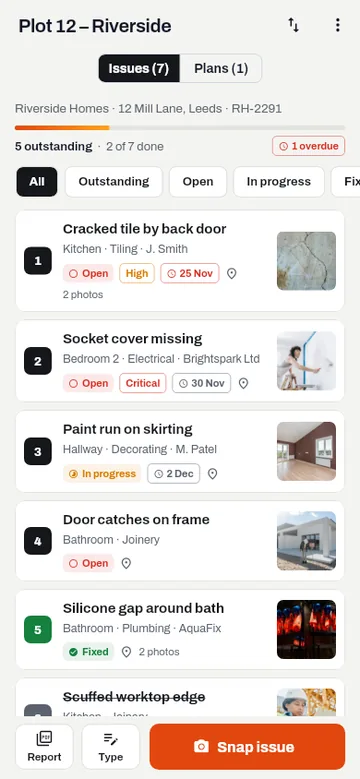
Snagline is our phone app for snag lists, site audits and punch lists. It is not released yet: it launches on iPhone first, with Android later, and people can join the waitlist. Issues are numbered, with several photos, status, priority, location, trade, assignee and due date; photos can be marked up with arrows, boxes and text; floor plans take numbered pins coloured by status; and reports are PDFs in three layouts with a signed sign-off, plus CSV export. It works offline. There is a free plan (up to 3 projects) and a Pro subscription with no per-seat pricing. Suits trades and small contractors who want snagging and audit reports from a phone without paying per user. It does not do scheduling, estimating, time tracking or budgets.
How to choose a construction app
- Start from the problem, not the feature list. Write down the one piece of paperwork that costs you most time or causes most disputes: snag lists, daily reports, safety checks, drawings. Pick the app category that fixes that.
- Count the people who will use it. One surveyor and a team of twenty need different things. Include subcontractors and clients if they need to see or update items.
- Compare per-seat and flat pricing. Per-user pricing is cheap for one person and grows with the team. At the November 2026 list prices, five users on Fieldwire Pro cost $195 a month billed annually, and five on Mitti Premium $120. Platforms priced by construction volume, flat-priced apps and one-off purchases behave differently again. Work out the yearly cost for your real headcount.
- Test offline. Basements, plant rooms and rural sites have no signal. Put the phone in flight mode, record a few items with photos, and check nothing is lost when you reconnect.
- Look hard at the report. The PDF is what your client sees. Check the cover, the photos, the order of items and the sign-off, and whether you can add your logo.
- Check integrations and exports. If you need data in a spreadsheet, accounts package or document system, check what the app actually exports or connects to, and on which plan.
- Check the platforms your team uses. Some apps are iOS-only or phone-only; some need a browser for setup.
- Ask what happens when you stop paying. Can you still export projects, photos and reports?
- Run a real trial. Use a free plan or trial on one live job for a week before you commit the whole team.
Common mistakes when buying construction software
- Buying a platform for a problem an app would solve. If you only need snag lists or daily reports, a full management platform adds set-up time and cost.
- Buying an app for a problem only a platform solves. The reverse also happens: if you need budgets, RFIs and schedules linked together, several small apps will not talk to each other.
- Forgetting the people at the end of the chain. If operatives or subcontractors find it awkward, they will go back to texting photos.
- Pricing for today's team only. Check the cost if you add two more people next year.
- Skipping the offline test. It is the most common way field apps fail on real sites.
- Not deciding who owns the setup. Templates, user accounts and project structure need one person to look after them.
Which construction app is right for a small contractor?
As a rough guide, based on how each vendor describes its product in November 2026:
- Running the whole business, several large jobs: a platform such as Procore, or Buildertrend for residential building.
- Working from drawings with a site team: Fieldwire.
- Snagging and defects across many units with subcontractors: PlanRadar.
- Daily reports and crew time: Raken.
- Safety and quality checklists across teams: Mitti.
- One person producing snag or audit reports at low cost: Site Audit Pro or Site Report Pro, available now; or Snagline once it launches.
Whatever you shortlist, try two at most on the same live job and keep the one your team actually uses.
Where Snagline fits
Snagline is a focused field app, not a construction management platform. It is for the snag list, site audit and punch list part of the job: capture an issue with a photo, mark it up, pin it on a plan, assign it, and send a signed PDF report. It is not available yet; if that is the part of the job you want to fix, join the waitlist below. If you need an app today, the others above are available now.
Questions
What is the best construction app for small contractors?
It depends on the job you need to fix. Platforms such as Procore and Buildertrend run whole projects; focused apps such as Fieldwire, PlanRadar, Raken, Mitti and Site Audit Pro handle drawings, snags, daily reports or inspections for less money and set-up time.
Are there free construction apps?
Some have free plans. As of November 2026 Fieldwire's Basic plan is free for up to 5 users and 3 projects, and Mitti (formerly SafetyCulture) has a free plan for up to 10 people. Site Report Pro is a free download with a paid unlock.
What is a construction management app?
Software that brings a construction project's information together: drawings, documents, schedules, RFIs, budgets and field records, shared between the office, site and often subcontractors and clients. Procore and Buildertrend are examples.
How much do construction apps cost?
Anything from a one-off purchase of around £13 to £15 for simple report apps to quote-based annual contracts for platforms. Many field apps charge per user per month, from about $23 to $89 at November 2026 list prices.
What happened to SafetyCulture?
SafetyCulture renamed itself Mitti in August 2026. Its website now redirects to mitti.com, and the inspection platform continues under the new name.
Do construction apps work offline?
Many field apps work offline and sync later, but it varies. Test any app with the phone in flight mode before you rely on it on a site with poor signal.