 Snagline
Defect tracking system for construction: how to capture, assign and close defects
A construction defect tracking system records every building defect from discovery to sign-off: a photo, the exact location, the responsible trade, a priority and due date, and a status that moves from open to fixed to closed once someone checks the work. It can be a spreadsheet, a phone app or a project platform; what matters is one shared list and a record of when each defect was reported and closed.
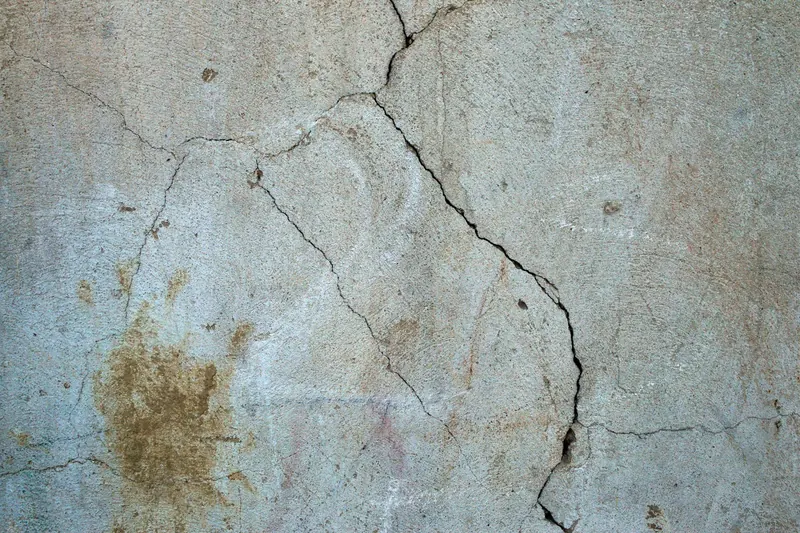
Construction defects, not software bugs
"Defect tracking system" means two different things. In software it is a bug tracker for testers and developers. This page is about building defects: cracked tiles, leaking joints, missing fire stopping, doors that will not close, work that does not match the drawings or specification. If you are looking for a software QA tool, this is not the guide you want.
In construction, defect tracking covers the whole life of each problem: from the moment someone spots it on site, through assigning it to the right trade, to someone checking the fix and closing it. The same process sits behind a snag list in the UK, a punch list in the US, and quality inspections during the build.
What construction defect tracking involves
Whatever tool you use, a defect goes through the same seven steps.
- Capture. Record the defect where you find it: a photo, a short title and a description of what is wrong and what "fixed" looks like.
- Locate. Say exactly where it is: building, level, room, grid line, elevation. A pin on a drawing removes most of the guesswork.
- Assign. Name the trade or subcontractor responsible, and ideally a person.
- Set a due date and priority. A missing handrail is not the same as a paint scuff. Priority decides the order; the due date makes it measurable.
- Track status. Open, in progress, fixed, closed. Everyone should see the same status.
- Verify and close. The trade says it is fixed; someone else checks it and closes it. Keep those two steps separate.
- Report. Send lists to each trade, summaries to the client, and keep a final record with photos for handover and the defects period.
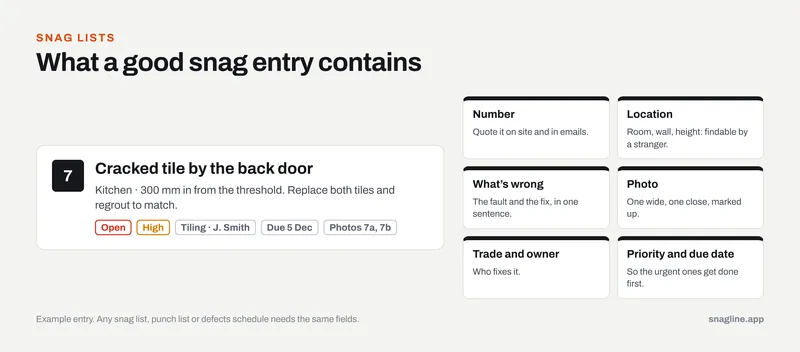
Each record should hold the same fields: number, location, what is wrong, photo, trade, priority, due date and status. Download the free snag list above in Word, Excel or PDF if you want those columns ready to use.
Spreadsheet, app or platform?
There are three common ways to run defect tracking. Each fits a different size of job.
| Spreadsheet | Phone app | Project platform | |
|---|---|---|---|
| Best for | Small jobs, one person, few photos | Inspectors, site managers and trades who walk and report | Large teams across several companies |
| Photos | Stored separately, linked by reference number | Attached to each defect, marked up on the spot | Attached, often with drawing management |
| Location | Typed text | Text plus pins on a plan | Pins on version-controlled drawings |
| Offline on site | On paper or laptop | Usually | Varies |
| Reports | Built by hand | PDF generated from the list | PDF plus dashboards |
| Set-up and cost | Free, but time-consuming on bigger jobs | Low; often a subscription | Higher; often per user |
A spreadsheet breaks down when photos multiply and several versions of the list circulate. A full platform makes sense when many people from different companies need to log in and update the same defects. Between the two, a phone app suits the person who finds defects and sends the report.
What to look for in defect management tools
- Photo first: take the picture, then describe the defect
- Markup on photos: arrows, circles and text so the trade sees the exact spot
- Floor plan pins that link to each defect
- Fields for trade, assignee, priority, due date and status
- Overdue items flagged without manual checking
- Works offline in basements, plant rooms and new shells with no signal
- Reports you can filter by status or trade and send as a PDF
- Export to CSV or Excel so data is not locked in
- Pricing that fits your team: per user or flat
- Clear information on where data is stored
Setting up defect tracking on a new job
Agree a few rules before the first inspection, whatever tool you choose:
- One list per project. Decide who owns it, usually the site manager or the GC's superintendent, and make everyone else add to it rather than keep their own.
- A location scheme. Use the same names for levels, rooms and grid lines as the drawings, so "L2, Room 2.14" means the same thing to everyone.
- A trade list. Fix the names of trades and subcontractors up front, so reports can be filtered and sent to each one.
- Priority rules. For example: Critical for safety or anything that stops handover, High for function, Medium for visible finish, Low for minor cosmetic items.
- Who can close. Name the people allowed to move a defect from Fixed to Closed.
- A reporting rhythm. A weekly list to each trade and a summary to the client keeps the numbers moving down.
Defects liability and rectification periods: the basics
Most construction contracts give the contractor a period after completion to put right defects that appear. The names and lengths vary by contract, so treat this as background, not legal advice, and read your own contract.
- JCT contracts (UK) call it the rectification period, formerly the defects liability period. It runs from practical completion and is set in the contract particulars; six or twelve months are common choices.
- NEC contracts use a defects date, the cut-off for notifying defects, often set at 26 or 52 weeks after completion, and a separate defect correction period for fixing each notified defect.
- AIA A201 (US) has a one-year correction period after substantial completion, in which the contractor must correct non-conforming work after written notice. It is not a cap on the contractor's wider liability.
- New homes usually come with a builder warranty, with its own rules for reporting snags in the first years.
Two things are common to almost all of them. First, defects generally have to be notified within the period, so a dated record of when each defect was reported matters. Second, the end of the period does not always end liability for hidden defects. Good defect tracking gives you the evidence either way: what was found, when it was reported, who was told and when it was fixed.
Common defect tracking mistakes
- Vague descriptions. "Fix tiling" tells nobody which wall, which tile or what is wrong.
- Photos without context. A close-up alone does not show where it is. Take a wider shot or pin it on the plan.
- No single list. Separate lists from the client, the site manager and the inspector drift apart.
- Closing on the trade's word. "Fixed" should mean someone else has checked it.
- Losing the record at handover. Keep the final list with photos and dates for the defects period.
How Snagline tracks construction defects
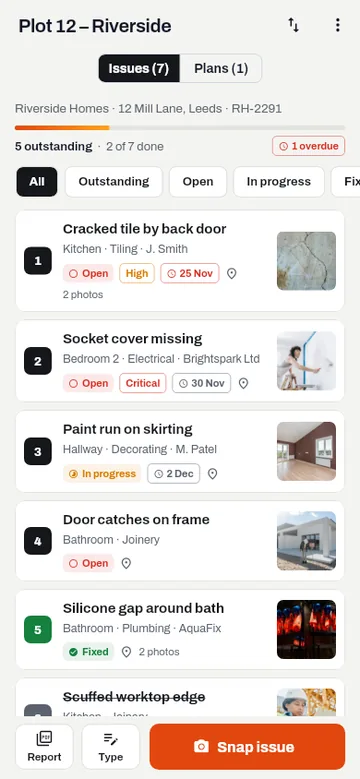
Snagline is a phone app for snag lists, punch lists and site audits, built for the person walking the site. Each project holds its own numbered list of issues. Tap "Snap issue" to take the photo first, then describe it, and mark up the photo with pen, arrows, boxes, circles and text labels. Each issue has a status (Open, In progress, Fixed, Closed), a priority (Low to Critical), a location, trade, assignee and due date, and overdue items are flagged. Add a PDF drawing or image as a floor plan and drop numbered pins that show each issue's status.
Reports come out as a PDF filtered by status, with the photos you choose, marked-up plans and a sign-off signature, or as a CSV for Excel. It works offline and saves to the phone as you go. Snagline is coming to iPhone first, with Android later; there is a free plan and a Pro subscription. Join the waitlist below.
Questions
What is a defect tracking system in construction?
It is a way of recording building defects so each one has a photo, location, responsible trade, due date and status, and is checked before it is closed. It can be a spreadsheet, an app or part of a project platform.
Can I track construction defects in Excel?
Yes, for small jobs. Use columns for number, location, description, trade, priority, due date, status and photo reference. It gets harder when there are many photos or several people editing copies of the file.
What is the difference between a snag list, a punch list and a defect list?
They are largely the same thing. Snag list is the UK term, punch list the US term, and defect list a general term, often used for defects found during the build or the defects period.
What is a defects liability period?
It is a period after completion in which the contractor must put right defects that appear. JCT contracts call it the rectification period and NEC uses a defects date; the length is set in each contract.
Is Snagline a software bug tracker?
No. Snagline is for physical defects on building sites and properties, such as snags, punch items and site audit findings.